
Smart Home Tech Guide
Professional Smart Home Systems: Control4, Savant, Crestron, Lutron, and What to Wire Before Drywall
Most of the smart home advice on this site is about products you can add to a house you already own. This page is about the homes I tour every week: new construction and luxury remodels where the technology is designed in from the first framing walk. The difference between a house that feels effortless and one that feels like a pile of gadgets comes down to two things: the wiring you run before drywall, and the integrator you hire to design the system. The brands matter less than most people think, but here are the ones I recommend and why.
If you're building in the Twin Cities, this is the conversation to have with your builder at the design stage, not at the electrical walk. Below: quick picks, the pre-wire checklist, what changed this year, a realistic budget, each layer of the system in detail, how to hire an integrator, a FAQ, and my bottom line.
QUICK PICKS
▶ Network: Ubiquiti UniFi (about $600 to $2,500) – the foundation; Dream Machine, PoE switch, and ceiling access points.
▶ Lighting and shades: Lutron – Caseta for existing homes, RadioRA 3 for new construction, HomeWorks for estates.
▶ Audio: Sonos – Era speakers, the Arc Ultra, and Sonos Amps driving in-ceiling zones.
▶ Voice: Josh.ai – private, natural voice control across all of it.
▶ Control platform: Control4 for most integrated homes, Savant for the best interface, Crestron for estates.
▶ Backup power: Anker SOLIX (about $2,000 to $4,000) – keep the rack, network, and cameras alive in an outage.
Plan ahead: pre-wire is everything
Wire is cheap while the walls are open and painful afterward. Whether or not you install the gear on day one, have your low-voltage contractor pull:
▶ Cat6 (or Cat6A) to every room: At least two drops behind every TV location, one to each ceiling access point location, one to every camera position at the eaves, the doorbell, the garage, and the mechanical room.
▶ Conduit: An empty 2-inch conduit from the mechanical room to the attic and to the main TV wall future-proofs everything, including whatever cable does not exist yet.
▶ Speaker wire: 16/2 or 16/4 to in-ceiling speaker locations in the kitchen, great room, primary suite, patio, and bathrooms, all home-run to the rack.
▶ Shade power: Low-voltage or line-voltage power at every window header you might ever motorize.
▶ Neutral wires and deep boxes: At every switch location, plus a plan for where lighting keypads replace banks of switches.
▶ A real rack location: A ventilated closet or mechanical room with a dedicated circuit, where the network, AV, and security equipment live together.
▶ Get it in writing: Ask for the low-voltage plan as a drawing, and walk it with the contractor before drywall. Photograph every wall with wire in it; those photos are worth more than the wiring map later.
What changed in 2026
Wi-Fi 7 became the default for new access points, which matters mostly because it handles the hundred-device household without breaking a sweat. Matter and Thread made it practical for a professional system to control mainstream devices from Apple, Google, and Amazon rather than only dealer-channel gear. Josh.ai and the control platforms all added AI-driven natural language, so "make it feel like a dinner party" now works. And whole-home battery backup moved from a generator conversation to a plug-in one, with Anker, EcoFlow, and others showing modular systems at CES 2026 that scale from the rack to the whole panel.
Budget
Plan on 5% to 10% of the home's cost for technology in a luxury build, covering the network, lighting and shade control, distributed audio and video, security, and the integration platform that ties it together. That number surprises people until they see what a well-run house feels like. If the budget is tighter, prioritize in this order: wire everything, build a proper network, do the lighting, then add audio, shades, and the control platform as money allows. The wire and the network are the two things you cannot easily add later.

The network: Ubiquiti UniFi
$600 to $2,500 for a whole house
MY PICK · THE FOUNDATION OF EVERYTHING
Every device on this site depends on the network, and the consumer router from your internet provider was never built for 80 connected devices. My house runs a UniFi Dream Machine Pro, a PoE switch, and U7 Pro Wi-Fi 7 access points in the ceilings, with a UNAS Pro for local storage. It's the same gear integrators install, and the app is friendly enough for a motivated homeowner.
WHY IT MATTERS
▶ Wired backbone: TVs, cameras, hubs, and streaming boxes on Ethernet; Wi-Fi reserved for phones, laptops, and the devices that need it.
▶ Separate networks: A VLAN for cameras and smart devices, isolated from your laptops, is basic hygiene an integrator will set up in an hour.
▶ PoE everywhere: Cameras, access points, doorbells, and touch panels powered over the same cable that carries data.
WHAT TO SPEC
For a typical new build: a Dream Machine Pro or Pro Max as the gateway, a PoE switch with enough ports for every camera, access point, and hardwired device (count them, then add 30%), one U7 Pro access point per 1,500 to 2,000 square feet mounted in the ceiling, and a UNAS Pro if you want local storage for cameras and files. The same system runs the UniFi Protect cameras and doorbell if you'd rather keep video in-house than use eufy or Reolink. What makes UniFi the right call is that it scales without changing platforms: the network in a 2,500-square-foot home and the network in a 10,000-square-foot home use the same app and the same parts, just more of them.

Lighting and shades: Lutron
Caseta from $60/switch; RadioRA 3 and HomeWorks through dealers
MY PICK FOR LIGHTING AND SHADES
Lutron is the one brand in this guide that spans DIY and professional. Caseta covers most existing homes, RadioRA 3 is the whole-home system for new construction with elegant keypads that replace switch banks, and HomeWorks is the estate-level platform. Serena and Lutron's architectural shades run on the same systems.
WHY LUTRON
▶ Reliability: Lutron's Clear Connect radio has never dropped a switch offline in my house.
▶ Scenes: One keypad button for Entertain, Dinner, Movie, Goodnight; lighting and shades together.
▶ Integration: Works natively with Crestron, Control4, Savant, Josh.ai, Sonos, and every voice assistant.
WHAT TO SPEC
In new construction, RadioRA 3 is the sweet spot: a processor in the rack, Sunnata keypads at the main entries and in the great room, dimmers in the boxes, and Serena or Lutron architectural shades on the windows, all programmed by the dealer with scenes for the way your family actually lives. HomeWorks is for very large homes and estates, with more zones, more integration, and more customization. Both keep the same philosophy as Caseta, which is that the light switch on the wall always works, no matter what the network is doing. That reliability is why nearly every integrated home I tour has Lutron on the wall regardless of which control platform is in the rack.
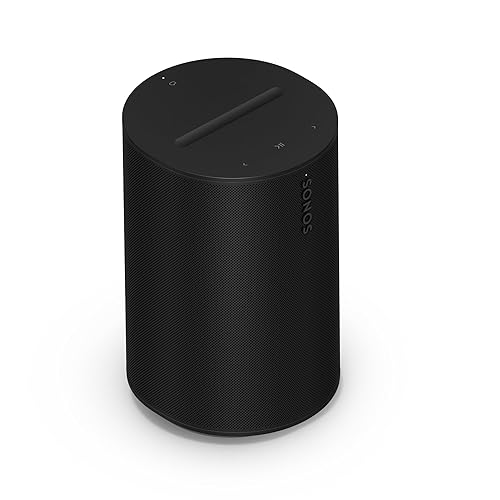
Audio: Sonos
$200 per speaker; Sonos Amp $700 per zone
MY PICK FOR WHOLE-HOME AUDIO
Sonos is the whole-home audio platform I recommend because it works equally well as a standalone system and as an integrated one. Era speakers on shelves, the Arc Ultra on the main TV, and a Sonos Amp driving in-ceiling Sonos Architectural speakers (by Sonance) in each pre-wired zone. Group any rooms, control from the app, a keypad, Josh.ai, or your integration system.
WHAT TO SPEC
Pre-wire in-ceiling speaker locations to the rack, then put a Sonos Amp on each zone driving Sonos Architectural speakers (made by Sonance). An Arc Ultra with a Sub and two Era 300s handles the main TV; Era 100s or Era 300s on shelves fill in bedrooms and the office. The reason I recommend Sonos over dealer-only audio platforms is that the family can control it from the Sonos app, a Lutron keypad, Josh.ai, or the control system interchangeably, and if you ever leave the integrator, the audio keeps working. Patio and pool zones with outdoor speakers are the upgrade owners use more than they expect.

Voice: Josh.ai
Through integrators
THE LAYER THAT TIES IT TOGETHER
Josh.ai is the privacy-first voice assistant built for professionally integrated homes, and it runs my main living spaces. Natural, multi-part commands, local processing, no data sharing, and deep integrations with Lutron, Sonos, Control4, Crestron, Savant, and hundreds of other brands. The Josh Nano microphones disappear into the ceiling. Ask your integrator to spec it.
WHAT TO SPEC
A Josh Core in the rack, Josh Nano microphones in the ceilings of the main living spaces, and Josh Micro tabletop units in bedrooms and offices. Josh handles compound requests ("dim the kitchen to 30 and play the dinner playlist"), understands room context, and processes everything locally, so nothing about your home leaves your home. It sits on top of Lutron, Sonos, Control4, Crestron, or Savant rather than replacing them, which is why it fits any of the platforms below. It's the piece that makes an integrated home feel modern rather than programmed.

Control platform: Control4
Through dealers
THE MOST COMMON INTEGRATED SYSTEM
Control4 is the platform I see most often in the $1M to $3M homes I tour. Touchscreens, keypads, and a remote that controls TV, audio, lighting, shades, climate, locks, and cameras from one interface, with the broadest third-party device compatibility in the category and a large dealer network across the Twin Cities. A great fit for a home that mixes brands.
WHEN TO CHOOSE IT
Control4 is the practical choice for most integrated homes: the widest device compatibility, the largest dealer base (which matters for service in ten years), and an interface that covers TV, music, lighting, shades, climate, locks, and cameras from one remote or touchscreen. Its OS updates have steadily improved the app, and the Halo remote is genuinely good. Choose Control4 when the home mixes brands, when you want the deepest bench of local dealers, and when the goal is one interface for everything rather than a showpiece.

Control platform: Savant
Through dealers
THE MOST ELEGANT INTERFACE
Savant pairs a beautifully designed app and remotes with strong lighting and energy management, including its own power and battery products. Scenes like Relax or Good Morning adjust lights, shades, music, and climate together. Choose Savant when the user experience for the family is the top priority.
WHEN TO CHOOSE IT
Savant is the platform to pick when the family's day-to-day experience is the priority. The app and remotes are the most refined in the category, scenes are easy for a homeowner to adjust without calling the dealer, and Savant's own lighting and power products (including whole-home battery and energy management) make it the strongest option for a home with solar and backup. It has a smaller dealer network than Control4, so confirm there's a strong Savant dealer in your market before committing.

Control platform: Crestron
Through dealers
THE ESTATE-LEVEL SYSTEM
Crestron is the pinnacle of custom integration, fully programmable and built to scale from one room to an entire property. Lighting, shades, AV, climate, security, and networking under one system, designed and maintained by certified programmers. It's the right answer for the largest homes and for owners who want a single point of responsibility.
WHEN TO CHOOSE IT
Crestron is what large, complex, or multi-building properties run on, and it's what you choose when you want a single vendor responsible for every system in the house. It's fully programmable, which means it can do almost anything and also means you depend on a certified programmer for changes. Crestron Home has made that friendlier for residential projects, but this is still the platform for the estate, the lake home with a guest house, or the owner who wants the same system in every property they own.

Backup power: Anker SOLIX
$2,000 to $4,000
THE NEW ESSENTIAL
A whole-house system needs to survive an outage. My rack, network, and cameras run on an Anker SOLIX battery so the house keeps working when the power doesn't, and the modular systems shown at CES 2026 scale up to whole-home backup with solar. Ask your integrator to put the rack and the refrigerator on a backed-up circuit at minimum.
WHAT TO SPEC
At minimum, a battery on the rack so the network, cameras, and security stay up through a short outage; a SOLIX F3800 or similar covers that with room for the refrigerator. For a whole-home solution, ask the integrator and electrician about a transfer switch and a modular battery bank (Anker, EcoFlow, Tesla Powerwall, or Savant's power products) sized for the circuits that matter: rack, fridge, furnace blower, sump pump, garage door. In a Minnesota winter, the furnace blower and the sump pump are the two that protect the house itself.
Hiring an integrator
▶ Start with CEDIA: The trade association for home technology professionals; use cedia.org to find certified integrators near you.
▶ Interview two or three: Ask what platforms they install most, who does the programming, and what their service agreement looks like after the install.
▶ Bring them in early: Before framing, and ideally at the design stage with your architect and builder. The most expensive words in this business are "we can add that later."
▶ Own your documentation: Insist on a wiring map, rack labels, and admin access to your own network.
▶ Hide the tech: In-ceiling speakers, Frame TVs, recessed touch panels, and keypads instead of switch banks. Present, but never in the way.
Frequently asked questions
Control4, Savant, or Crestron?
Control4 for most homes and the broadest dealer support; Savant for the best family-facing interface and energy management; Crestron for estates and owners who want one vendor responsible for everything. Lutron lighting, Sonos audio, and Josh.ai voice work with all three.
How much does a professional smart home system cost?
Plan on 5% to 10% of the build cost for a luxury home. A well-wired network with Lutron lighting and Sonos audio in a typical new build can land in the tens of thousands; full Control4 or Crestron integration with shades, distributed video, and a media room goes well beyond that. The wiring is a small fraction of the total and is the part you must do during construction.
Can I do part of it myself?
Yes. UniFi networking, Lutron Caseta, Sonos, and most of the gear in my other guides are homeowner-friendly. The integrator earns their fee on RadioRA 3 and HomeWorks programming, the control platform, distributed video, and the rack. A good integrator will tell you which parts you can own yourself.
What happens to the system when I sell?
Everything wired in conveys: the rack, keypads, in-ceiling speakers, shades, and access points. Have the integrator transfer the account to the buyer, hand over admin access to the network, and include the wiring map in the closing packet. A documented, professionally installed system is a selling point; an undocumented one is a liability.
Is an integrated system worth it in a smaller home?
The wire and the network always are. Beyond that, Lutron Caseta plus Sonos plus a UniFi network gets a 2,500-square-foot home most of the way to an integrated feel for a fraction of a Control4 install. Add the control platform when the home is large enough that one interface for everything matters.
The bottom line
Wire everything, build the network on UniFi, put Lutron on the walls and windows, and run Sonos through the ceilings. That combination is the backbone of nearly every well-run home I tour, whether or not there's a control platform in the rack. Add Josh.ai when you want voice that respects your privacy, choose Control4, Savant, or Crestron based on the size of the home and the dealer you trust, and put the rack on a battery.
Most of all, hire the integrator before framing. The most expensive words in this business are "we can add that later." If you're building or buying new construction in the Twin Cities, the Twin Cities New Construction Guide shows the homes these systems go into, and the Doyle Real Estate Team can help you plan the technology conversation with your builder from day one.
Resources
▶ AVOID Homes With These Huge Technology Mistakes – my video on what builders get wrong
▶ Smart Home Tech for the Luxury Market – my REALTOR® Magazine column
▶ Technical Difficulties Podcast: Smart Home Secrets from a PRO – our conversations with integrators
▶ Twin Cities New Construction – my other channel, where I tour the homes these systems go into
Links to Amazon are affiliate links. Using them supports testing like this at no extra cost to you.