
Smart Home Tech Guide
The Best Smart Thermostats of 2026
A smart thermostat is still the highest-return upgrade in the smart home. It pays for itself in energy savings, most utilities rebate part of the cost, and it's the one device in the house you interact with every single day, whether you notice it or not. It is also the upgrade buyers ask me about most when we walk through a home: they want to know what it does, whether it stays with the house, and whether it's worth replacing the beige box on the wall. The answer to that last one is almost always yes.
Ecobee has been on my wall for years and it's still my favorite, mostly because of the room sensors. A thermostat can only measure the hallway it lives in; sensors let it heat and cool the rooms you actually use. Below is the full 2026 lineup from ecobee, Google Nest, Honeywell, and Amazon, with a pick for every budget, the wiring check that trips up more installs than anything else, the questions I get asked most, and my bottom line.
QUICK PICKS
▶ Best overall: ecobee Smart Thermostat Premium (about $260) – room sensor included, air quality monitor, Siri and Alexa built in.
▶ Best value: ecobee Smart Thermostat Enhanced (about $200) – the same app and sensors without the extras.
▶ Best budget: ecobee Smart Thermostat Essential (about $140) – the cheapest way into the ecobee ecosystem.
▶ Best for Google homes: Google Nest Learning Thermostat (4th gen) (about $240 to $280) – the best-looking thermostat you can buy.
▶ Best for Alexa homes on a budget: Amazon Smart Thermostat (about $60 to $110) – frequently on sale.
What changed in 2026
Three things moved this year. First, every major brand now speaks Matter, so an ecobee or a Nest shows up in Apple Home, Google Home, Alexa, and SmartThings without any workarounds. Second, prices at the entry level dropped: ecobee's Essential and Amazon's thermostat put real scheduling and remote control under $150. Third, utilities are leaning harder on demand-response programs, which means bigger rebates and annual bill credits for letting your thermostat make small adjustments on the hottest and coldest days. If you bought a smart thermostat in 2019 and never touched a rebate, you left money on the table.
How to choose a smart thermostat
▶ Room sensors: If any room in your house is consistently too hot or too cold, choose a thermostat that supports remote sensors (ecobee, Nest Learning, Honeywell T9). This single feature matters more than any other.
▶ Ecosystem: All of the picks below work with Alexa and Google. Apple Home users should stick with ecobee, Nest (via Matter), or Honeywell T9; the Amazon Smart Thermostat does not support Apple Home.
▶ Your HVAC system: Heat pumps, two-stage furnaces, humidifiers, and dual-fuel setups need a thermostat with enough terminals and the right accessory support. ecobee Premium and Nest Learning handle complex systems best.
▶ Display and voice: Only the ecobee Premium has a built-in voice assistant. If you want to talk to your thermostat, that is the one; if you already have a speaker nearby, save the money.
▶ Rebates: Before you check out, search your utility name plus "smart thermostat rebate." In Minnesota, Xcel Energy and CenterPoint both offer instant or mail-in rebates, and some models qualify for larger discounts through the utility marketplace.
Before you buy: the C-wire check
Pull your current thermostat off the wall and look for a wire on the C terminal. That common wire powers a smart thermostat's Wi-Fi radio and screen. If it's missing, you have three options: use the power adapter most brands include (ecobee's Power Extender Kit installs at the furnace), pull a new cable from the furnace to the thermostat, or choose a model designed for two-wire heat-only systems. Also note whether your system has multiple stages or a heat pump; the ecobee Premium and Nest Learning both handle complex systems well. Take a photo of the wiring before you disconnect anything; every brand's app asks for it during setup, and it makes a service call far easier if something goes wrong.
WHO IT IS FOR
Two-story homes, houses with a finished basement, and anyone whose bedroom is a different temperature than the thermostat says. The Premium's zinc body and glass face look like they belong in a new build, which is why builders and integrators reach for it. In practice the features I use most are the ones that fade into the background: the sensors averaging bedrooms at night, the radar noticing the house is empty, and the fan running a few minutes an hour to even things out. The air quality monitor is a bonus you'll appreciate the first time it tells you to open a window after cooking.
It also tends to hold its value in a real estate transaction. A smart thermostat is a fixture and conveys with the house, so leaving a Premium on the wall is a small, visible upgrade that makes a listing photo look current.
WHO IT IS FOR
Most households. You get the same scheduling, eco+ energy savings, geofencing, and Matter support as the Premium, and you can add SmartSensors later as you learn which rooms need them. The display is plastic instead of glass and there is no microphone or speaker, which some people consider a feature. If you are outfitting a rental or a second property, this is the model I'd specify: full remote control and sensor support at a price that doesn't sting if a tenant fiddles with it.
WHO IT IS FOR
First-time smart thermostat buyers, cabins, and anyone replacing a manual dial on a simple furnace and air conditioner. The Essential covers one-stage and most two-stage systems and comes with ecobee's Power Extender Kit for homes without a C-wire, which removes the most common reason a budget install fails. Because it supports the same SmartSensors as its bigger siblings, it grows with you: start with the thermostat, add a sensor to the bedroom next winter, and you have most of what the Premium does for far less.
WHO IT IS FOR
Homes already running Google Home, Nest cameras, or a Google TV, and anyone who wants the thermostat to disappear into the wall. The fourth generation is the first Nest with a temperature sensor in the box, which closes the biggest gap it had against ecobee, and the learning feature means most owners never build a schedule at all: adjust it for a week and it figures out the pattern. Matter support brings it into Apple Home and Alexa, though the deepest integration is still in the Google Home app, where it now shows energy history and offers suggested schedules.
One practical note from the field: the mirrored display shows fingerprints, and the learning behavior can be confusing for a household with irregular hours. Turn off Auto-Schedule if you'd rather set it yourself.
WHO IT IS FOR
Alexa households on a budget, rentals, and anyone who just wants remote control and a schedule without paying for sensors they won't use. Amazon builds it with Honeywell and controls it through the Alexa app, where Hunches can set the temperature back automatically when the house is empty. It regularly drops well under $100 on Prime Day and in the holiday sales, and when it does, it is the least expensive way to add scheduling and remote control to a house. Just confirm your system has a C-wire or buy the version bundled with Amazon's power adapter.
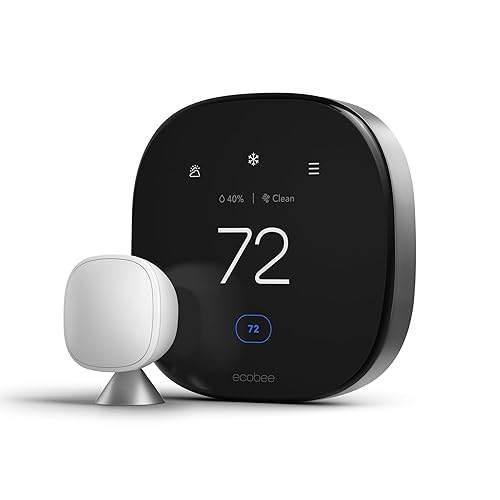
ecobee Smart Thermostat Premium
$260
MY PICK · THE ONE ON MY WALL
The best thermostat you can buy for a home with rooms that never quite match the hallway temperature. The included SmartSensor detects occupancy and temperature, so the system heats or cools the rooms you're actually in rather than the hallway where the thermostat lives. Add more sensors for bedrooms and the basement.
KEY BENEFITS
▶ Air quality monitor: Tracks VOCs, CO2, and humidity and can run the fan to freshen the house.
▶ Siri and Alexa built in: Plus Apple Home, Google Home, and SmartThings compatibility.
▶ Radar occupancy: Knows when the house is empty and sets back automatically; geofencing on your phone does the same from further out.
▶ Rebates: Check Xcel, CenterPoint, or your local utility; many offer $50 or more, and some pay extra to enroll in peak-demand programs.

ecobee Smart Thermostat Enhanced
$200
THE SWEET SPOT
Same great app, scheduling, and smart home integrations as the Premium, with a slightly simpler display and no built-in voice assistant or air quality sensor. It still supports the SmartSensors (sold separately), which are the main reason to choose ecobee in the first place. If you don't care about talking to your thermostat, save the $60.

ecobee Smart Thermostat Essential
$140
BEST BUDGET ECOBEE
The 2025 entry-level model replaced the ecobee3 Lite with a fresh design and a lower price. Wi-Fi control, scheduling, eco+ energy savings, and compatibility with Alexa, Google, Apple Home, and SmartThings. It also works with the room sensors, which is what makes it a better long-term buy than most thermostats at this price.

Google Nest Learning Thermostat (4th gen)
$240 to $280
BEST FOR GOOGLE HOMES · THE PRETTIEST ONE
The 2024 redesign brought a larger, sharper display that shows temperature and weather from across the room, and Google now includes a wireless temperature sensor in the box. It learns your schedule from your adjustments, works with Matter, and looks the most like a piece of design rather than a control. Alexa and Apple Home support come through Matter.
KEEP IN MIND
▶ Some homeowners report Nest calling for heat or cooling more often than expected. Ask your HVAC pro to check the compressor lockout and stage settings after install.

Honeywell Home T9
$195
THE RELIABLE ALTERNATIVE
Honeywell's answer to ecobee's room sensors, with the reliability the brand is known for and an approachable app. The T9 comes with one smart room sensor and supports up to 20, works with Alexa, Google, and Apple Home, and it's a favorite of HVAC installers because of its broad system compatibility. Solid, unflashy, and it just works.
WHO IT IS FOR
Households that value reliability and broad HVAC compatibility over design. The T9 handles conventional systems, heat pumps with auxiliary heat, and multi-stage equipment, and its room sensors are rated for up to 200 feet, which helps in large homes. The Resideo app is plain but stable, and the T9 is the thermostat most likely to be recommended by an HVAC contractor, which matters when you need a service tech to understand what is on the wall.

Amazon Smart Thermostat
$60 to $110
BEST BUDGET PICK
Built with Honeywell hardware and controlled through the Alexa app, this is the least expensive path to remote control, scheduling, and Alexa Hunches that set the temperature back when you leave. No sensors, no screen to speak of, and no Apple Home or Google support. For a rental, a cabin, or an Alexa-first household, it's a strong upgrade for the money, and it's frequently on sale.
Getting the most out of it
▶ Enroll in a utility program: Many Minnesota utilities rebate smart thermostats and pay an annual credit for demand-response participation. You can opt out of any individual event.
▶ Use the sensors: Put one in the primary bedroom and one where you spend evenings; average them at night and prioritize the living space during the day.
▶ Set it and leave it: A modest setback (a few degrees) while you sleep or work saves more over a year than aggressive swings that make the system work harder.
▶ Check the fan setting: Running the fan for a few minutes each hour evens out hot and cold rooms, especially in two-story homes.
Frequently asked questions
Which smart thermostat saves the most money?
Any of them, if you use the schedule and setbacks. Utility studies generally show roughly 8 to 15 percent savings on heating and cooling versus a manual thermostat. The room sensors on ecobee, Nest, and Honeywell add comfort more than savings; the money comes from consistent setbacks while you sleep and while the house is empty.
Do I need a C-wire?
For most models, yes, or you need the power adapter that comes in the box. The ecobee Power Extender Kit and Amazon's power adapter both install at the furnace in about ten minutes. If you're uncomfortable opening the furnace, most HVAC companies will do it as a small service call, and many will install the thermostat at the same time.
Does the smart thermostat stay with the house when I sell?
In Minnesota and most states, yes. Thermostats are fixtures and convey with the home unless the purchase agreement excludes them. If you want to take yours, say so in the listing and put a standard thermostat back before showings. Buyers do notice the brand on the wall, and it's one of the cheapest upgrades that makes a home feel current.
ecobee or Nest?
Ecobee if you want the best sensor system, Apple Home without Matter workarounds, and a built-in voice assistant; Nest if you live in the Google ecosystem and want the best-looking hardware. Both are excellent, and both now include a sensor in the box.
Will it work with my heat pump or boiler?
ecobee Premium, Nest Learning, and Honeywell T9 all support heat pumps with auxiliary heat. Boilers and radiant systems are usually two-wire heat-only setups; the ecobee Essential and Enhanced with the Power Extender Kit work well there. Check the brand's compatibility checker before you order.
The bottom line
If you buy one thing from this guide, make it the ecobee Smart Thermostat Premium. It solves the problem every other thermostat ignores, which is that the hallway is not where you live, and it does it with the best hardware and the most integrations on the market. The Enhanced gets you almost all of that for $60 less, and the Essential is the budget pick I'd put in a rental. Google households should go straight to the Nest Learning, and if you simply want scheduling and remote control for as little money as possible, the Amazon Smart Thermostat on sale is hard to argue with.
Whatever you choose, do three things the first week: enroll in your utility's rebate and demand-response program, put a sensor in the primary bedroom, and set a modest overnight setback. That is where the savings come from. For a look at how a thermostat fits into the rest of a connected house, see my Smart Home Tech Guide and the $500, $1,000, and $2,000 smart home packages, and if you're buying or selling a home in the Twin Cities, the Doyle Real Estate Team can help, including new construction where a smart thermostat is often a builder option worth taking.
Resources
▶ Top 25 Smart Home Innovations to Look Forward to This Year – my REALTOR® Magazine column, including the Ecobee Essential and Honeywell X2S
▶ What a Smart Home Reviewer Actually Uses at Home (2026 Tour) – the ecobee and room sensors in my house at 5:43
▶ Technical Difficulties Podcast: Are Furnaces Dead? The Smart HVAC Revolution – S5E7 on heat pumps and the future of home heating
Links to Amazon are affiliate links. Using them supports testing like this at no extra cost to you.